 B-good
B-good
B-good
B-good is a product of Kitswys Pty Ltd. Embed automated calculation logic and supplier verification guardrails straight into your daily Odoo accounting workflows to secure audit readiness long before year-end reviews.
Standard ERP layouts treat supplier compliance as passive fields. Daily purchase orders and routines move ahead uninterrupted, even if a vendor's level drops or certificate expires entirely.
When your financial year-end arrives, teams must manually reconstruct old transactional paths. This manual rescue mission risks compliance leakage and penalizes your final recognition scorecard.
B-good binds live validation parameters directly to active ledger data entries. Instead of troubleshooting historical data gaps, your operating accounts run against an unyielding, background evaluation matrix.
This allows financial managers to effortlessly preview calculations, test live supply simulations, and confidently isolate reporting periods without disturbing core ledger entries.

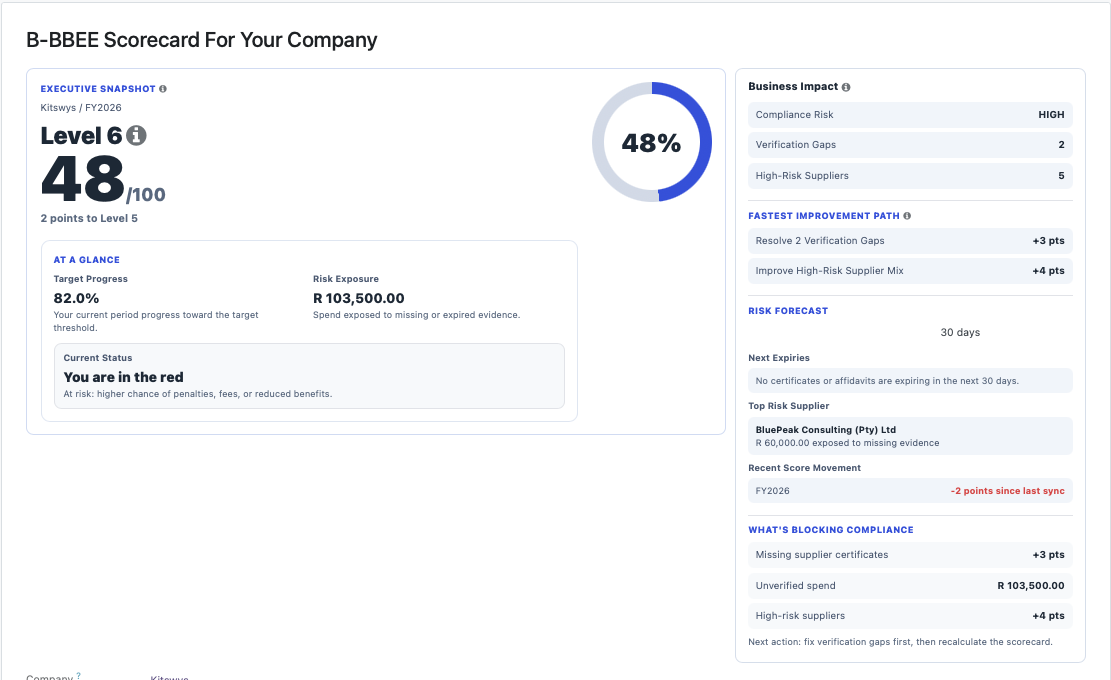
The scorecard assessment gives the business a single output view: total measured spend, recognised procurement spend, achieved percentage, and the point value assigned to the period.
That makes the final result easy to present in a meeting, easy to audit, and easy to link back to the supplier and spend records that produced it.
Keep the narrative on the site, then send users straight to the downloadable ZIP so they can install it locally and try the Odoo build for themselves.